Best DTF transfer options for cotton vs polyester blends
Best overall for mixed-design orders: Build Your Gang Sheet. Best for finished layouts: Upload Your Gang Sheet. Best for individual graphics: DTF Transfers by Size. The best DTF transfers for cotton polyester blends start with a suitable transfer and a tested application process—not the ordering format alone.
TL;DR
Brooklyntransfers offers the best DTF transfers for cotton polyester blends by ordering workflow, not verified fabric-specific formulations.
Choose Build Your Gang Sheet for separate files; Upload Your Gang Sheet for a finished layout.
Choose DTF Transfers by Size for individual graphics, then test the actual garment before production.
Polyester content requires attention to heat sensitivity and dye migration; a gang sheet does not resolve either.
Why this matters
Cotton and polyester blends do not all behave alike under a heat press. Fiber content, garment dyes, finishes, and the transfer's application requirements affect the result. A successful press on one blank does not establish a production setting for another.
For your 2026 production plan, separate two decisions: how you submit the artwork and whether the transfer suits the garment. Brooklyntransfers is best for print shops choosing between individual DTF graphics, separate artwork files, and finished gang-sheet layouts.
What makes the best DTF transfers for blends
Garment suitability: Confirm compatibility with the actual blank, not just the word polyester.
Application instructions: Obtain the required temperature, time, pressure, and peel method.
Artwork readiness: Choose an ordering route that matches your files.
Production control: Approve a sample before pressing the batch.
Repeatability: Save the approved artwork and application record together.
Keeps the order focused on the required graphic size
Does not replace planning a combined layout
These are ordering options, not three documented adhesive or film formulations. None establishes a separate cotton-specific, polyester-specific, or dye-blocking specification. Choose the workflow first, then confirm the transfer and application process for your garment.
1. Build Your Gang Sheet: best for mixed-design production
Build Your Gang Sheet accepts multiple single files or different files for assembly onto a gang sheet. It fits jobs where your artwork is ready individually but not arranged into a complete production layout.
An apparel brand ordering front graphics, sleeve marks, and several designs can use this route without preparing one combined image beforehand. Keep the layout organized around cutting and pressing, rather than packing artwork without regard to the production sequence.
Build Your Gang Sheet pros:
Works with multiple separate artwork files.
Supports different graphics within the same layout workflow.
Removes the need to arrive with a finished gang-sheet image.
Build Your Gang Sheet cons:
You still need to verify every graphic's final dimensions and quantity.
Combining designs does not establish compatibility across different garment fabrics.
Dense layouts require a workable cutting plan.
Best for: Print shops and apparel brands assembling separate files for a mixed-design run.
For 2026 repeat orders, retain an approved artwork list alongside the layout. Record which graphic belongs on which garment, especially when similar-looking blanks have different fiber compositions.
Verdict: Buy Build Your Gang Sheet when your files are separate and the combined layout still needs preparation.
2. Upload Your Gang Sheet: best for finished layouts
Upload Your Gang Sheet is for artwork already assembled into one image. It fits a shop that prepares and checks the full layout before ordering.
The operational advantage is control over the source file: you determine the arrangement before submission. The responsibility comes with it. A finished layout still needs a final check for dimensions, artwork versions, repeated graphics, and unwanted backgrounds.
Upload Your Gang Sheet pros:
Matches an existing gang-sheet preparation workflow.
Keeps artwork arrangement in your source file.
Fits reorders where the approved layout remains unchanged.
Upload Your Gang Sheet cons:
Requires a completed combined image before submission.
Incorrect sizes or quantities need correction before ordering.
Artwork approval does not establish a safe press setting for every blank.
Best for: Production teams with a finished, checked gang-sheet file.
For a cotton and polyester blend reorder, keep the garment specification with the approved layout. If the customer changes the blank, treat garment approval as a separate task even when the graphic stays identical.
Verdict: Buy Upload Your Gang Sheet when the layout is complete; hold the order if the file still contains unresolved changes.
3. DTF Transfers by Size: best for individual graphics
DTF Transfers by Size is the direct ordering route when the graphic's dimensions are your main purchase decision. Use it when you need to specify an individual design rather than prepare a combined gang-sheet layout.
Choose the size from the actual garment and placement. A chest graphic, sleeve mark, and back print need separate placement decisions; using the same artwork does not make them the same production job.
DTF Transfers by Size pros:
Keeps attention on the graphic's required dimensions.
Avoids preparing a combined sheet when that is not your workflow.
Makes individual placement decisions easier to document.
DTF Transfers by Size cons:
Does not organize multiple designs into a finished gang-sheet file.
Size selection alone does not establish garment compatibility.
Different garment sizes still require a placement review.
Best for: Individual graphics and orders organized around specific print dimensions.
Verdict: Buy DTF Transfers by Size when you know the required graphic dimensions and do not need a combined layout workflow.
Cotton vs polyester blends: what changes at the press
A fiber label identifies composition, not a complete pressing recipe. A 100% cotton tee, a 50% cotton/50% polyester tee, and a 100% polyester jersey represent different material starting points. None supplies the transfer manufacturer's application instructions.
Garment type
Main production check
What not to assume
Cotton
Surface, finish, placement, and transfer application requirements
Every cotton blank uses the same settings
Cotton/polyester blend
Heat response and dye behavior on the actual blank
Cotton content eliminates polyester-related risks
Polyester
Heat sensitivity, dye migration risk, and transfer suitability
A standard application recipe fits every polyester garment
Polyester dyes can migrate into a transfer during or after heat application. Polyester garments can also develop unwanted press marks or heat-related appearance changes. Check the actual style and color rather than approving an entire fabric category from one sample.
Do not respond to a difficult blank by lowering the press temperature without checking instructions. Insufficient application conditions can compromise adhesion. If the transfer's required process conflicts with the garment's requirements, resolve compatibility before production instead of improvising a compromise setting.
For your 2026 job records, keep the blank style, color, fiber label, transfer identification, and approved press settings together. That record is more useful than a note saying the design worked on a blend.
Prepare files and approve the garment before ordering
Use the same approval sequence whether you order by size or submit a gang sheet. The artwork and the garment both need a production decision.
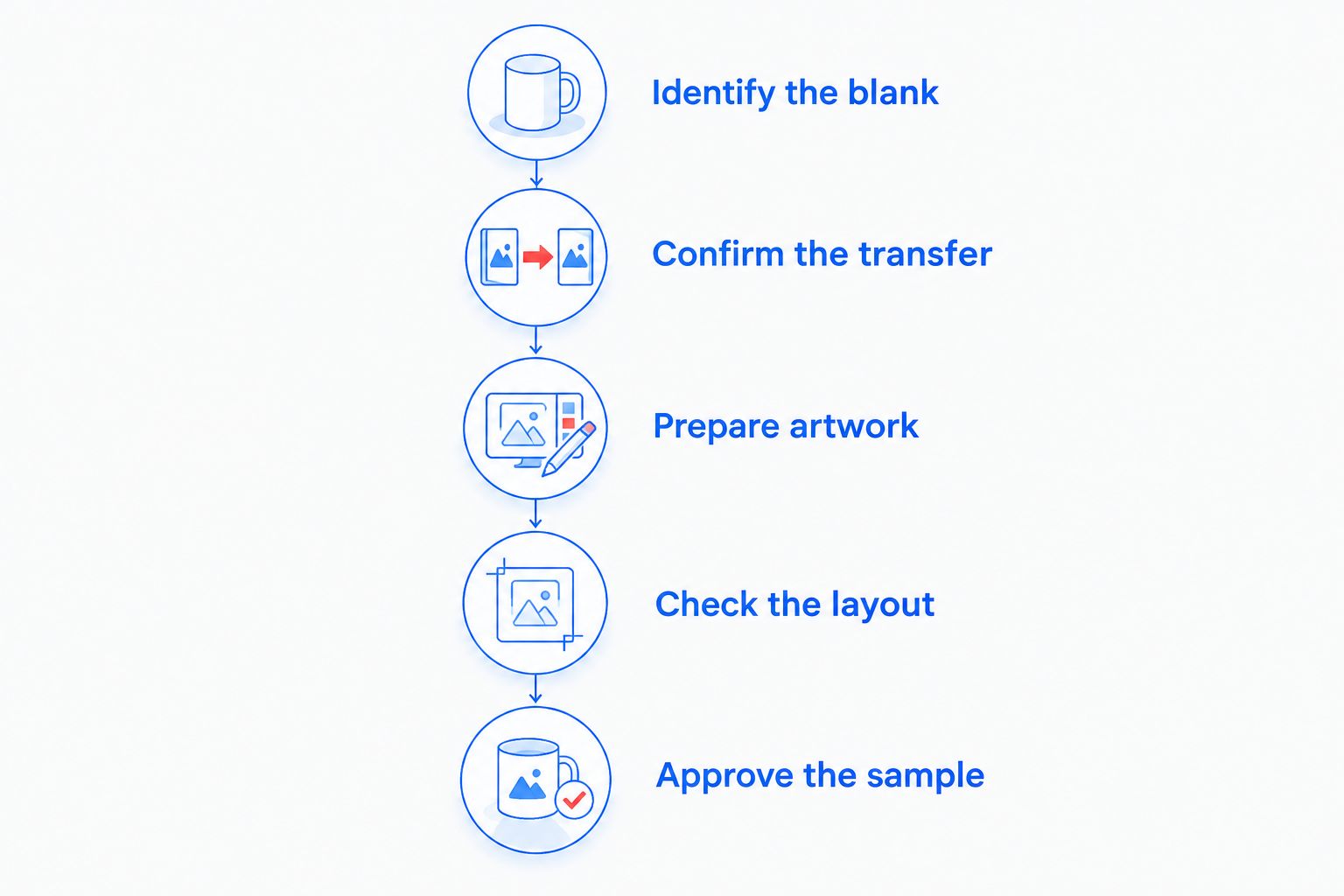
Identify the blank
Read the fiber label and record the garment style and color. Check the garment supplier's decoration guidance, including any restrictions relevant to heat application. Do not substitute a visually similar blank for the approved one without checking it.
Confirm the transfer
Ask for the transfer's application instructions and confirm suitability for the garment. For dyed polyester or a migration-sensitive job, ask specifically about dye migration rather than requesting a generic transfer recommendation.
Prepare artwork
Set each graphic to its intended finished dimensions. Remove unwanted backgrounds, inspect fine details, and check that transparent areas are intentional. Follow the printer's file requirements rather than applying a universal resolution or file-format rule.
Check the layout
Verify quantities, dimensions, artwork versions, and room for cutting. Group graphics so the person cutting the sheet can distinguish jobs and placements. Filling space is not a useful goal if the resulting sheet is difficult to process accurately.
Approve the sample
Apply a transfer to the actual blank using the supplied instructions. Inspect adhesion and appearance, then follow the specified care process before approving the run. Include a later inspection when dye migration is a concern; a clean result immediately after peeling is not the whole evaluation.
Approve both the artwork and the actual garment before releasing the batch.
Record the approved result before releasing the remaining garments. Keep the file version and garment information attached to the job so a reorder does not depend on someone's memory.
Plan dispatch separately from delivery
Brooklyntransfers states that DTF orders placed by 1:00 PM Eastern ship or are ready for pickup the same day. That describes dispatch or pickup readiness—not same-day arrival at your shop.
For a 2026 customer deadline, work backward from the date you need to finish pressing. Allow for transport, receiving, garment checks, and your own production schedule. Do not treat the order cutoff as the time the transfers reach your press.
Keep artwork approval ahead of the deadline decision. A fast dispatch does not correct a wrong graphic size or replace a garment test.
How these options are ranked
The ranking prioritizes artwork readiness, layout responsibility, garment approval, and repeat-order control. Build Your Gang Sheet is the default for separate files; Upload Your Gang Sheet fits completed layouts; DTF Transfers by Size fits individual dimension-led orders.
This is a workflow ranking, not a claim that one option has better adhesion, wash performance, or dye resistance than another. Brooklyntransfers DTF ordering options solve different file-preparation needs; garment testing determines whether the production process is suitable.
Which DTF transfer option should you choose?
Choose Build Your Gang Sheet if you have separate artwork files and need to assemble a mixed-design order. Choose Upload Your Gang Sheet if the combined file is already checked. Choose DTF Transfers by Size if individual graphic dimensions define the order.
For cotton versus polyester blends, keep the buying decision separate from application approval. No ordering format removes the need to confirm compatibility with the blank.
FAQ
What's the best DTF transfer option for cotton polyester blends?
Build Your Gang Sheet is the default for mixed-design orders made from separate files. Choose Upload Your Gang Sheet for a finished layout or DTF Transfers by Size for individual graphics; confirm garment compatibility separately.
Can I use the same DTF transfer on cotton and polyester blends?
Use the same DTF transfer only when its application requirements suit both garments. Confirm the supplier's guidance and test each actual blank rather than assuming fiber content alone establishes compatibility.
Is a gang sheet better than ordering DTF transfers by size?
A gang sheet is better suited to organizing multiple graphics into a combined layout. Ordering by size fits individual graphics; neither format establishes better adhesion or dye resistance.
What press temperature should I use for a cotton polyester blend?
Use the transfer supplier's specified temperature after confirming compatibility with the garment. There is no single press temperature that applies to every cotton polyester blend and DTF transfer.
How do I prevent dye migration on polyester garments?
Confirm that the transfer and application process suit the actual dyed polyester garment, then test before production. Do not assume a standard transfer is dye-blocking or that reducing heat alone resolves migration.
Should I upload a finished gang sheet or build one online?
Upload a finished gang sheet when the combined image is complete and checked. Use Build Your Gang Sheet when you have separate files that still need arranging.
Does same-day shipping mean my DTF transfers arrive today?
No. Brooklyntransfers states that DTF orders placed by 1:00 PM Eastern ship or are ready for pickup the same day; shipping describes dispatch, not arrival.
One last thing
A repeat graphic is not automatically a repeat production job. A changed garment style, color, or fiber composition calls for a fresh compatibility check even when the artwork is identical.
Make your 2026 reorder record include both approvals: the exact artwork file and the actual blank. That keeps a familiar design from bypassing the production checks it still needs.