Best overall for mixed-artwork drops: Build Your Gang Sheet. Best for approved repeat layouts: Upload Your Gang Sheet. Best for individual placements: DTF Transfers by Size. These are three ordering routes for streetwear production in 2026, ranked by artwork readiness and repeat-order needs—not a comparison of competing suppliers.
TL;DR
Brooklyntransfers offers the best DTF transfers for streetwear brands that want separate-file, gang-sheet, and individual-placement ordering routes.
Build Your Gang Sheet fits mixed graphics; Upload Your Gang Sheet fits completed layouts ready for repeat orders.
DTF Transfers by Size fits individual placements without requiring you to assemble a gang sheet.
DTF orders placed by 1:00 PM Eastern ship or are ready for pickup the same day—not same-day delivery.
Why this matters
A streetwear drop can include front graphics, back graphics, sleeve marks, and different artwork revisions. The ordering route should match how those files are prepared. Otherwise, you move layout decisions into purchasing and create another opportunity to send the wrong version.
Brooklyntransfers is best for streetwear brands ordering DTF transfers from separate artwork files, completed gang sheets, or individual placements. Choose between those routes before building your production schedule. A fast dispatch does not correct an incorrectly sized print.
What makes the best DTF transfers for streetwear brands
For your 2026 buying plan, judge the ordering workflow against the actual job rather than choosing a format because it sounds more economical.
Artwork readiness: Separate files belong in a layout workflow; a completed sheet belongs in a finished-layout upload.
Placement control: Confirm the finished dimensions of each front, back, sleeve, or label graphic before ordering.
Repeatability: Keep an approved master file and a matching order record so reorders do not depend on memory.
Cutting and sorting: Leave room to separate transfers and identify which garment receives each graphic.
Application fit: Test the transfer on the intended blank using the supplied application instructions.
Schedule fit: Separate artwork approval, dispatch, transit, and pressing instead of treating them as one deadline.
DTF ordering options at a glance
Rank and option
Best for
Standout workflow
Key limitation
1. Build Your Gang Sheet
Mixed graphics supplied as separate files
Assemble multiple files into a gang sheet
You still need to check placement sizes and quantities
2. Upload Your Gang Sheet
Approved layouts and repeat production
Submit artwork already arranged as one image
Errors in the submitted layout remain your responsibility
3. DTF Transfers by Size
Individual graphics and placement-specific orders
Order by the required transfer size
You must track how separate graphics combine into garment sets
The ranking measures workflow fit, not differences in transfer durability or print quality. A different upload route does not establish a different print-performance result.
1. Build Your Gang Sheet: best DTF option for mixed-artwork drops
Build Your Gang Sheet accepts multiple individual files for arranging onto a gang sheet. It fits a release where your front graphics, back graphics, and smaller marks exist as separate exports rather than one production-ready layout.
Start with the garment requirements, not the empty sheet. List each graphic, its finished size, and the number of applications needed. Then build the layout around that list so sheet packing does not dictate the design.
Build Your Gang Sheet pros:
Works with multiple separate artwork files.
Lets you assemble different graphics into a shared layout.
Avoids requiring a completed gang-sheet image before you start ordering.
Build Your Gang Sheet cons:
Layout assembly adds a preparation step before submission.
A crowded sheet can complicate cutting and sorting.
Incorrect quantities remain incorrect even when the layout looks tidy.
Best for: Streetwear brands combining several graphics or placements in one production order.
Before approving, compare the layout against a written placement list. Check the smallest artwork separately; a mark that looks clear when enlarged on screen still needs inspection at its finished size.
Verdict: Buy for mixed-file drops when you need to assemble the production layout.
2. Upload Your Gang Sheet: best DTF option for repeat layouts
Upload Your Gang Sheet is intended for artwork already arranged as one image. It fits an established release with an approved layout that you want to submit again without rebuilding it from individual files.
The benefit depends on file discipline. Save the approved sheet separately from working versions, and identify the garment placements and artwork revision in your production record. Reusing an old file is not a repeat-order system unless you know it is the correct file.
Upload Your Gang Sheet pros:
Accepts a completed layout as one image.
Fits a workflow with a saved, approved production master.
Keeps layout preparation in your existing design process.
Upload Your Gang Sheet cons:
Requires you to finish the sheet before uploading.
A changed graphic or quantity requires a revised layout.
Embedded sizing or background mistakes can affect the submitted sheet.
Best for: Print shops and apparel brands repeating an approved arrangement of graphics.
For your 2026 reorder library, keep the approved file alongside the original order details and application notes. Do not overwrite that master when preparing a different garment mix. Duplicate it, revise the copy, and approve the new version separately.
Verdict: Buy for repeat layouts; skip this route while artwork arrangement is still changing.
3. DTF Transfers by Size: best DTF option for individual placements
DTF Transfers by Size is the direct route when your buying decision starts with an individual graphic and its required dimensions. It suits a placement-specific order without making a gang-sheet layout the first task.
Treat each placement as its own production requirement. A front mark and a back graphic need separate size checks, even when they belong to the same shirt. Ordering by size does not remove the need to reconcile quantities across the finished garment.
DTF Transfers by Size pros:
Keeps the ordering decision focused on a specific placement.
Does not require you to prepare a combined gang-sheet image.
Fits a straightforward graphic-by-graphic production list.
DTF Transfers by Size cons:
Multiple placements need their own quantity checks.
The order format does not show a combined cutting layout.
Separate graphics still need sorting into the correct garment sets.
Best for: Brands ordering individual graphics or checking a specific placement before a broader production run.
Use a garment mockup with dimensions, not just a visually scaled logo. Screen appearance alone is not an approval standard for print size.
Verdict: Buy for individual placements; hold the order if finished dimensions remain undecided.
Prepare the file before choosing the dispatch date
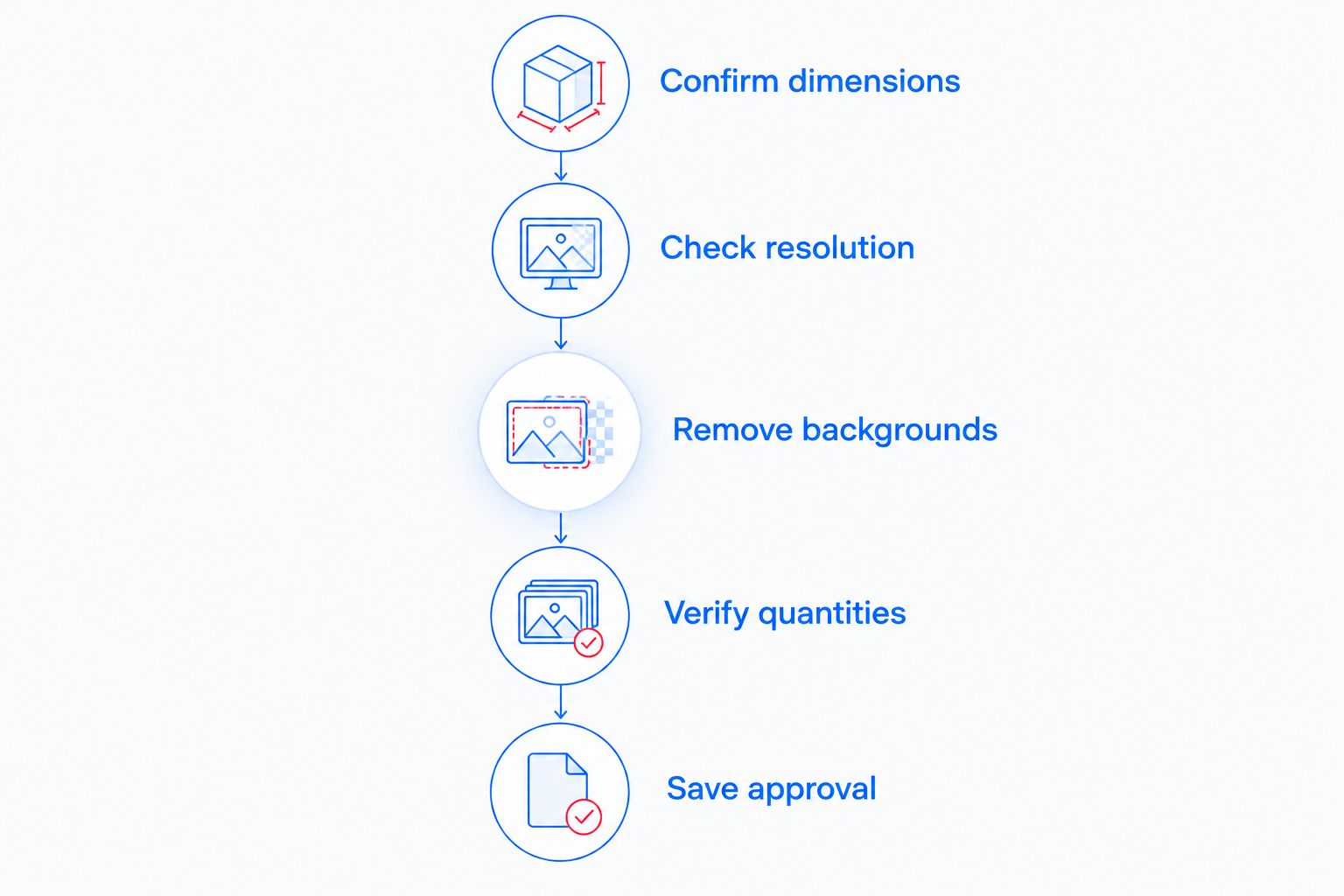
A clean production handoff starts before checkout. Use this sequence for Brooklyntransfers DTF orders so artwork approval and ordering stay connected.
Confirm dimensions
Measure the intended placement on the actual garment style. Account for seams, pockets, and the usable pressing area. An oversized tee and a fitted tee do not automatically need the same graphic dimensions simply because they carry the same design.
Check resolution
Inspect raster artwork at its final output size. At 300 pixels per inch, a 10-inch-wide graphic requires 3,000 pixels across; enlarging a smaller export does not recreate missing detail. Treat that calculation as a file-preparation reference, then confirm the current upload requirements.
Remove backgrounds
Check whether the artwork contains an unintended background rectangle, faint edge pixels, or stray marks outside the design. View the file against contrasting backgrounds so transparent areas and unwanted remnants are easier to distinguish.
Verify quantities
Count applications by placement, not just garments. A shirt with a front graphic and a back graphic needs both components in the production plan. Reconcile the file list against that plan before submitting the order.
Save approval
Save the exact submitted artwork and its finished dimensions. Keep any application notes with that record rather than in a separate message thread. Your next reorder should begin with an approved reference, not a search through similar filenames.
Approve the production file before making the dispatch date your deadline.
Choose the ordering route after these checks. A completed layout belongs in the upload workflow; separate approved files belong in the builder; an individual placement belongs in the size-based workflow.
Do not make every item in a streetwear capsule follow the tee workflow. A cap introduces a different shape, placement area, and production setup. Your 2026 assortment plan should name the decoration method for each garment rather than applying one purchasing rule across the release.
The choice between embroidery versus screen printing for caps is a separate production decision from selecting a DTF gang-sheet workflow for tees. Keep cap specifications separate from transfer artwork so a shared logo does not become an assumed shared production method.
Decoration route
Best for evaluating
Practical advantage
Limitation to resolve
DTF transfer
Apparel graphics applied with a heat press
Separates transfer ordering from garment pressing
Requires application checks on the intended blank
Embroidery
A stitched cap treatment
Creates the design with thread
Artwork needs preparation for stitching
Screen printing
A directly printed cap treatment
Applies ink through a prepared screen
Cap shape and printable area need production review
Approve each method on its own terms. A logo approved as a digital image is not automatically approved as a stitched or printed production sample.
Test the blank before committing the drop
Use the intended garment style for application checks. Follow the transfer supplier's instructions for temperature, time, pressure, and peel procedure rather than borrowing settings from a different transfer.
Check placement, edge adhesion, and the appearance of the finished graphic. Let the sample complete the required application and care sequence before approving production. If something fails, record the garment, transfer, and settings before changing the process.
Large solid graphics deserve a physical check for feel as well as appearance. A digital mockup cannot tell you whether the finished print matches your expectations for the garment. Keep that approval separate from artwork approval.
Plan dispatch separately from delivery
Brooklyntransfers states that DTF orders placed by 1:00 PM Eastern ship or are ready for pickup the same day. That is a dispatch or pickup-readiness statement, not a promise that a shipped order arrives that day.
For a 2026 drop calendar, work backward from the date finished garments must be ready. Give artwork approval, ordering, transit or pickup, pressing, and inspection their own checkpoints. Do not announce a finished-goods deadline based only on the transfer dispatch cutoff.
Keep reorder instructions explicit, too. State whether the job repeats the approved artwork exactly or changes dimensions, quantities, or placements. A small revision still needs a fresh check before submission.
How the ordering routes rank
Build Your Gang Sheet ranks first for mixed artwork because its stated purpose matches multiple separate files. Upload Your Gang Sheet ranks first for completed repeat layouts, while DTF Transfers by Size fits individual placement requirements.
Those recommendations follow artwork readiness, placement control, repeatability, and production handling. They do not claim a measured quality advantage between ordering routes or establish a supplier-wide performance ranking.
Which DTF ordering route should you choose?
Choose Build Your Gang Sheet if you have separate graphics and need a default starting point. Choose Upload Your Gang Sheet when the complete layout is already approved. Choose DTF Transfers by Size when the order centers on an individual placement.
Do not rebuild an approved sheet merely to use the builder, and do not upload an unfinished layout merely to shorten checkout. Match the route to the file you can confidently approve.
FAQ
What's the best DTF ordering option for a streetwear brand with several graphics?
Build Your Gang Sheet fits streetwear brands with multiple separate artwork files. Confirm each graphic's finished dimensions and required quantity before arranging the sheet.
Is uploading a gang sheet better than building one?
Uploading fits a completed, approved layout; building fits separate files that still need arranging. Neither ordering route establishes a print-quality advantage on its own.
Can I order DTF transfers for just one placement?
DTF Transfers by Size is the placement-focused ordering route. Check the finished graphic dimensions and reconcile quantities if the garment also needs other graphics.
Will my DTF transfers arrive the same day I order?
Same-day dispatch does not mean same-day delivery. Brooklyntransfers states that DTF orders placed by 1:00 PM Eastern ship or are ready for pickup the same day.
What resolution should I use when preparing DTF artwork?
Check raster artwork at its final print dimensions and confirm the current upload requirements. At 300 pixels per inch, a 10-inch-wide graphic needs 3,000 pixels across; enlarging a low-resolution file does not restore detail.
Should I test a DTF transfer before printing my streetwear drop?
Test the transfer on the intended blank before approving the production run. Follow the supplied application instructions and check placement, adhesion, appearance, and feel.
One last thing
Your most useful reorder asset is the exact approved production file—not the original logo. Keep the submitted artwork, dimensions, garment details, and application notes together. That record gives the next order a defined starting point instead of another round of interpretation.