Best gang sheet sizes for small print shops in 2026
Best overall: the shortest gang sheet that fits a confirmed job; best for mixed orders: a mixed-job sheet; best for repeat logos: a repeat-design sheet. This 2026 guide explains the best gang sheet sizes for print shops by workload, cutting requirements, and reorder needs—not by assuming every supplier offers the same dimensions.
TL;DR
The best gang sheet sizes for print shops fit approved artwork and confirmed quantities without unnecessary unused space.
Brooklyntransfers offers gang-sheet building and upload options for different file-preparation workflows.
Choose mixed-job sheets for varied artwork and repeat-design sheets for recurring logos.
Separate urgent jobs when combining orders would delay production.
Confirm selectable sheet dimensions before laying out your final file.
Why this matters
A larger gang sheet is not automatically a better purchase. Empty space, difficult cutting, and transfers your customer has not approved all work against an efficient order.
For a small shop, the right sheet size starts with the job ticket. You need approved artwork, final print dimensions, quantities by placement, and a clear production deadline before deciding how much sheet area to order.
Brooklyntransfers is best for print shops that want to build a DTF gang sheet from separate files or upload an assembled layout. Start with the ordering options at Brooklyntransfers, then choose the workflow that matches your files.
For 2026 production planning, keep dispatch and arrival separate. DTF orders placed by 1:00 PM Eastern ship or are ready for pickup the same day; that does not mean same-day delivery.
What makes the best gang sheet size for print shops?
Use these criteria before comparing sheet options:
Usable dimensions: Check the selectable sheet width and length, including any required margins. A nominal sheet measurement is not permission to place artwork against every edge.
Confirmed demand: Size the layout around approved transfers you need, rather than filling space with speculative inventory.
Artwork fit: Judge the arrangement at final print dimensions. Shrinking a chest graphic to fill a gap changes the order.
Cutting access: Leave the separation required to cut individual transfers without damaging neighboring artwork.
Production grouping: Combine jobs only when their approval status and deadlines allow them to move together.
Reorder control: Keep an identifiable final layout so the next order does not start from an uncertain version.
The most useful 2026 buying rule is simple: choose the smallest selectable sheet that accommodates the approved layout and its cutting requirements. Move up only when the next size solves an actual fit or quantity problem.
Gang sheet sizing options at a glance
These are ranked sizing strategies, not claims about available catalog dimensions. Check the current order tool for the exact sizes you can select.
1. Shortest fitting sheet: best for one confirmed job
Start with every approved placement for the order, arranged at its final dimensions. Select the shortest available sheet that holds that layout within the stated file requirements.
This is the default recommendation for a shop that does not need speculative extras. It makes the sizing decision follow the order instead of letting an oversized canvas dictate what you purchase.
Shortest fitting sheet pros:
Keeps transfer quantities connected to a confirmed job.
Makes excess copies easier to spot before submission.
Gives you a clear baseline for the next reorder.
Shortest fitting sheet cons:
Different artwork shapes can leave gaps you cannot use.
Late additions can require a different sheet size or revised layout.
Best for: A customer order with approved artwork and settled quantities.
Do not move up a size just because the next sheet looks easier to fill. First check whether repositioning approved artwork solves the problem without changing its print dimensions.
Verdict: Buy the shortest fitting sheet for a complete, approved job.
2. Mixed-job sheet: best for several approved designs
A mixed-job sheet combines different designs, placements, or customer orders in one layout. Select its dimensions after arranging the actual artwork, not before.
Brooklyntransfers offers Build Your Gang Sheet for uploading multiple single files or different files onto a gang sheet. That workflow fits a shop whose artwork is ready but has not yet been assembled into one file.
Mixed-job sheet pros:
Lets differently shaped artwork share a layout.
Keeps several approved designs within one ordering task.
Gives you a chance to use gaps with other confirmed transfers.
Mixed-job sheet cons:
Similar-looking artwork needs deliberate sorting after cutting.
One unapproved design can hold up the combined order.
Crowding the layout makes cutting harder.
Best for: Several approved jobs that can share the same production schedule.
Keep a separate quantity list by customer, design, and placement. A sheet that contains every file can still contain the wrong number of each transfer.
Verdict: Buy a mixed-job sheet when all included work is approved and ready together.
Choose the workflow that matches your files
Use the builder when you have separate artwork files. Use the upload option when your designs are already assembled into one image; neither route replaces checking dimensions and quantities.
A repeat-design sheet uses repeated copies of an approved graphic. Its size follows the required quantity and the arrangement that fits within the supplier's usable dimensions.
Use this approach for recurring placements when you know the design and size will stay consistent. Keep separate versions for different print dimensions; resizing an old layout without checking every instance introduces avoidable uncertainty.
Repeat-design sheet pros:
Keeps repeated artwork consistent within the file.
Makes transfer counting straightforward when rows are clearly arranged.
Supports reordering from an identified, approved layout.
Repeat-design sheet cons:
An artwork error repeats across the entire layout.
Unneeded copies become inventory rather than completed work.
A changed logo or placement size makes the saved layout unsuitable.
Best for: Recurring, approved graphics with a known production requirement.
Before submitting a repeat order in 2026, compare the saved layout with the current job ticket. A familiar filename is not evidence that the customer wants the same dimensions or quantity again.
Verdict: Buy a repeat-design sheet for confirmed repeat demand; skip speculative extras.
4. Deadline-separated sheets: best for urgent production
Separate sheets when jobs have different approval dates or production deadlines. Choose a fitting size for each group instead of waiting to fill one larger layout.
The benefit is scheduling control. A ready order stays independent of another customer's artwork changes, even when combining those designs would occupy more of a single sheet.
Deadline-separated sheet pros:
Keeps approved work independent of unfinished artwork.
Makes each layout easier to assign to a production date.
Separates urgent transfers from later work during receiving.
Deadline-separated sheet cons:
Individual layouts can leave more unused space.
More files require clearer naming and order tracking.
Best for: Shops handling urgent jobs alongside work that is not ready.
Brooklyntransfers' 1:00 PM Eastern DTF cutoff concerns same-day dispatch or pickup readiness. Plan your pressing schedule around actual receipt of the transfers, not the time the order leaves production.
Verdict: Buy separate sheets when combining work puts a confirmed deadline at risk.
5. Transfers ordered by size: best without sheet assembly
Ordering transfers by size is an alternative to choosing a gang sheet. Use it when your task is to specify individual designs rather than prepare and manage a combined layout.
This route belongs in the decision because not every order needs a gang sheet. Compare the current ordering options against the job you actually have.
Transfers ordered by size pros:
Gives you an ordering route outside gang-sheet assembly.
Keeps the decision focused on individual artwork dimensions.
Avoids preparing a combined file solely to place the order.
Transfers ordered by size cons:
Does not use a gang-sheet layout you have already prepared.
Still requires accurate dimensions and quantities for each design.
Best for: Individual-design orders where sheet assembly adds an unnecessary task.
Verdict: Buy by size when individual transfer ordering matches the job better.
Check the file before choosing the final sheet
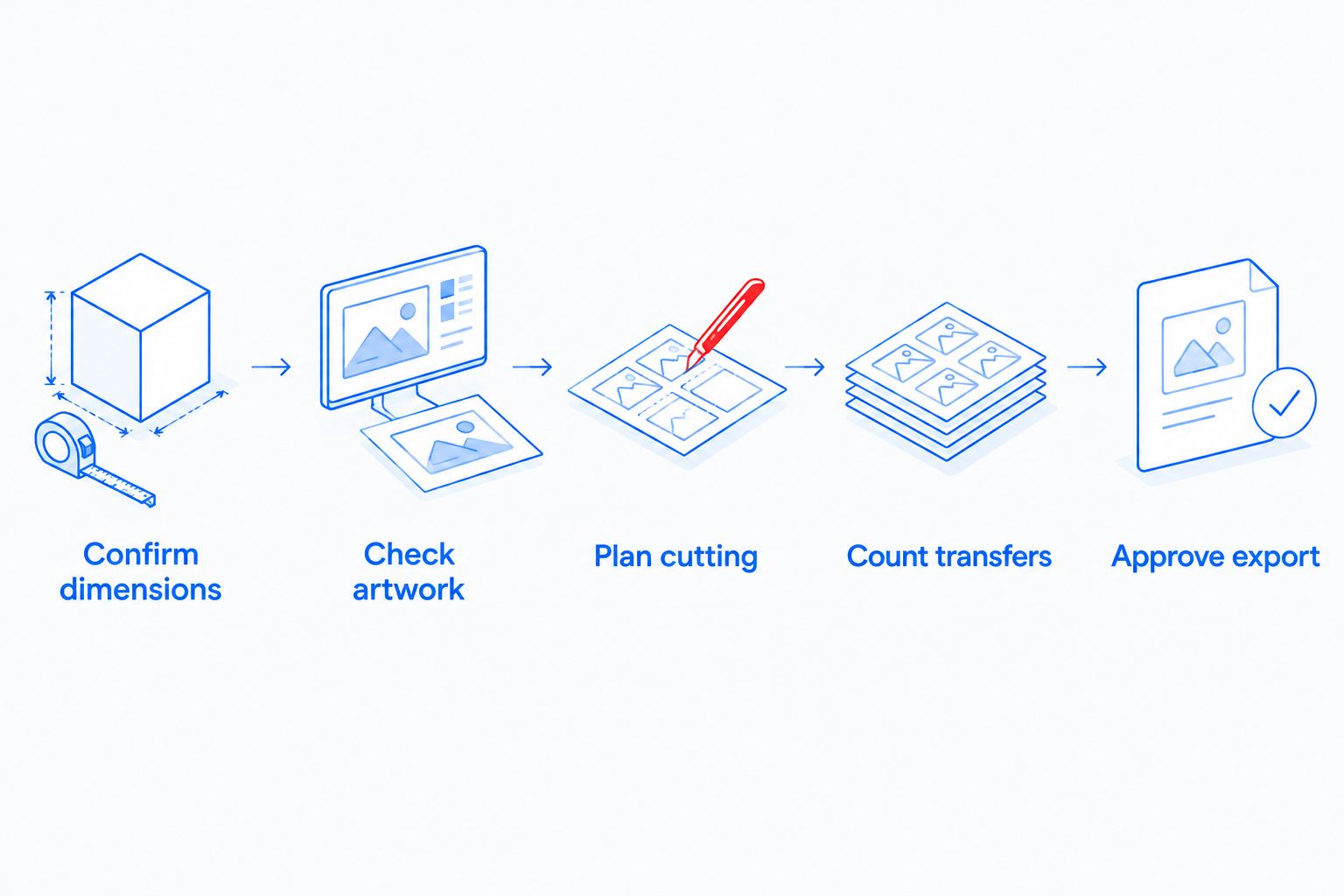
A sheet is ready when its dimensions, contents, and cutting plan agree with the job ticket. Follow this sequence before submitting your 2026 order.
Confirm dimensions
Check the selected sheet dimensions against the final layout. Verify the artwork at its intended print size rather than judging it from an on-screen preview alone.
Check artwork
Remove unintended backgrounds and inspect fine details at final size. Follow the current upload requirements for file type and resolution; do not assume a file accepted elsewhere meets this order's requirements.
Plan cutting
Inspect the space between neighboring designs. Keep enough access to separate transfers without cutting into printed artwork, using the supplier's stated layout guidance.
Count transfers
Match each design and placement to the job ticket. Count front prints, back prints, and other placements separately rather than treating garment quantity as transfer quantity.
Approve export
Save an identifiable final version and inspect the exported file. Confirm that nothing shifted, disappeared, or changed size between the working layout and the submitted artwork.
Choose the final sheet size only after the artwork, quantities, and cutting plan agree.
A compact layout is not successful if your team cannot cut and identify its contents. Preserve the job's production requirements before trying to occupy every gap.
How the options rank
The ranking puts confirmed demand first, then artwork fit, cutting access, scheduling, and reorder control. The shortest fitting sheet is the default because it answers a specific job without requiring extra transfers to justify its size.
Mixed-job and repeat-design layouts serve different workloads. Deadline separation takes priority when combining jobs would delay approved work; ordering by size remains the alternative when a gang sheet adds unnecessary preparation.
Which gang sheet size should you choose?
Choose the smallest selectable sheet that holds your approved artwork at final size with the required cutting space. That is the default for an undecided buyer.
Use a mixed layout for different approved designs, a repeat layout for recurring graphics, and separate sheets for different deadlines. Check the current dimensions before exporting; this guide does not assign unsupported sheet measurements to Brooklyntransfers.
FAQ
What's the best gang sheet size for a small print shop?
The best gang sheet size is the smallest selectable sheet that fits your approved artwork at final dimensions with the required cutting space. Choose from the supplier's current options rather than assuming a standard width.
Should I always buy the largest DTF gang sheet?
No. A larger DTF gang sheet is useful only when its space serves confirmed transfers and a workable cutting layout. Filling it with unneeded copies creates inventory, not completed orders.
Can I put different customers' designs on one gang sheet?
Combine different customers' designs only when their artwork is approved and their schedules allow them to move together. Keep separate counts by customer, design, and placement so cutting does not create sorting mistakes.
Should I build a gang sheet or upload one?
Use Build Your Gang Sheet when you have multiple separate files. Use Upload Your Gang Sheet when your artwork is already assembled into one image, then verify the final dimensions and quantities before submitting.
How much space should I leave between DTF designs?
Follow the supplier's current spacing requirements and leave enough access to cut each transfer without damaging adjacent artwork. Do not treat a tightly packed preview as proof that the layout is ready to submit.
Does same-day DTF shipping mean same-day delivery?
No. Brooklyntransfers states that DTF orders placed by 1:00 PM Eastern ship or are ready for pickup the same day. Dispatch and pickup readiness are different from delivery to your shop.
Can I reuse a gang sheet file for a repeat order in 2026?
Reuse an approved file only after confirming that the artwork, dimensions, and quantities still match the current job. Keep the submitted export identifiable so your team can distinguish it from earlier drafts.
One last thing
The smallest artwork on a sheet deserves its own check. A large graphic can look correct while a small placement contains an unreadable detail or an unintended background.
Inspect every distinct design at final print size before ordering. Sheet efficiency starts after artwork approval, not instead of it.